
What Is the AI Stack?
When people talk about artificial intelligence, they often focus on the model.
Which model is the most capable? Should it be large or small? Open or proprietary?
These questions matter, but a model alone is not an AI application.
A useful AI system also needs somewhere to run, access to relevant information, a way to coordinate its work, and an interface through which people can use it.
Together, these parts form the AI stack.
A simple version has five layers:
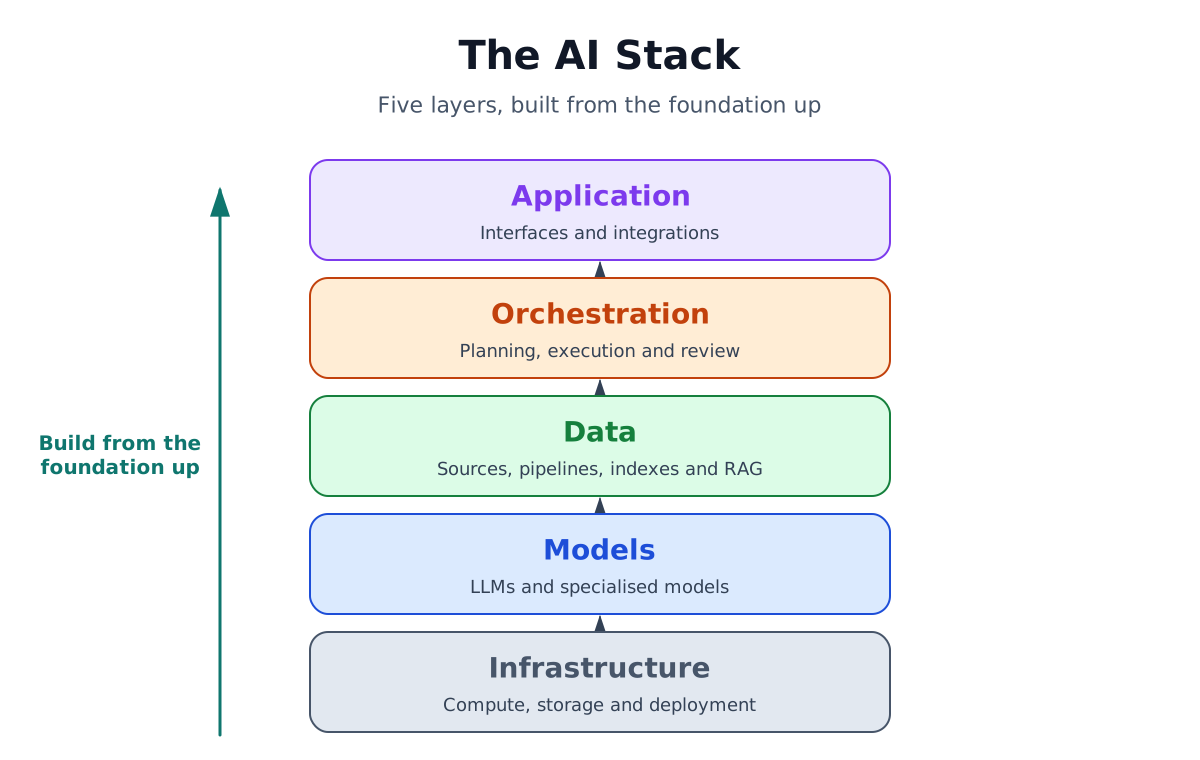
Users experience the stack from the top down. To understand how it is built, it helps to start at the bottom.
Throughout this article, we will use a customer support assistant as an example. A customer asks:
"Where is my order, and can I still change the delivery address?"
1. Infrastructure
Infrastructure is the technical foundation on which the AI system runs.
It includes processors, memory, storage, networking, servers, and the software needed to operate the model and supporting services.
AI models often run on GPUs because GPUs can perform many calculations in parallel. Smaller models may run on a laptop or phone, while larger models usually require cloud or data-centre infrastructure.
There are three common deployment options:
- Local: on a laptop, phone, or workstation
- Cloud: on rented infrastructure that can scale with demand
- On premises: on hardware owned and operated by the organisation
Infrastructure affects which models can run, how quickly they respond, how much the system costs, and where the data is processed.
For our support assistant, this layer runs the model, databases, search systems, and application.
2. Models
The model is the part of the system that understands, generates, or analyses information.
A language model can interpret a customer's question and write a clear response. Other models may specialise in images, audio, classification, search, embeddings, coding, or tool use.
Models differ in several ways.
Some are open and can be hosted by the organisation using them. Others are proprietary and accessed through an external provider.
They also vary in size. Larger models often have broader capabilities, but they need more computing power. Smaller models can be faster, cheaper, and better suited to focused tasks.
Platforms such as Hugging Face provide catalogues of open and specialised models for many different use cases.
The best model is not always the largest one. The right choice depends on the task and the required balance between quality, speed, cost, privacy, and hardware needs.
In our example, the model understands that the customer is asking two questions:
- Where is the order?
- Can the delivery address still be changed?
But the model does not know the actual order status or company policy. That information comes from the data layer.
3. Data
A model's built-in knowledge is not always enough.
It may be outdated, based mainly on public information, or missing the private data needed for a particular task.
The data layer adds that missing context. It has four main parts.
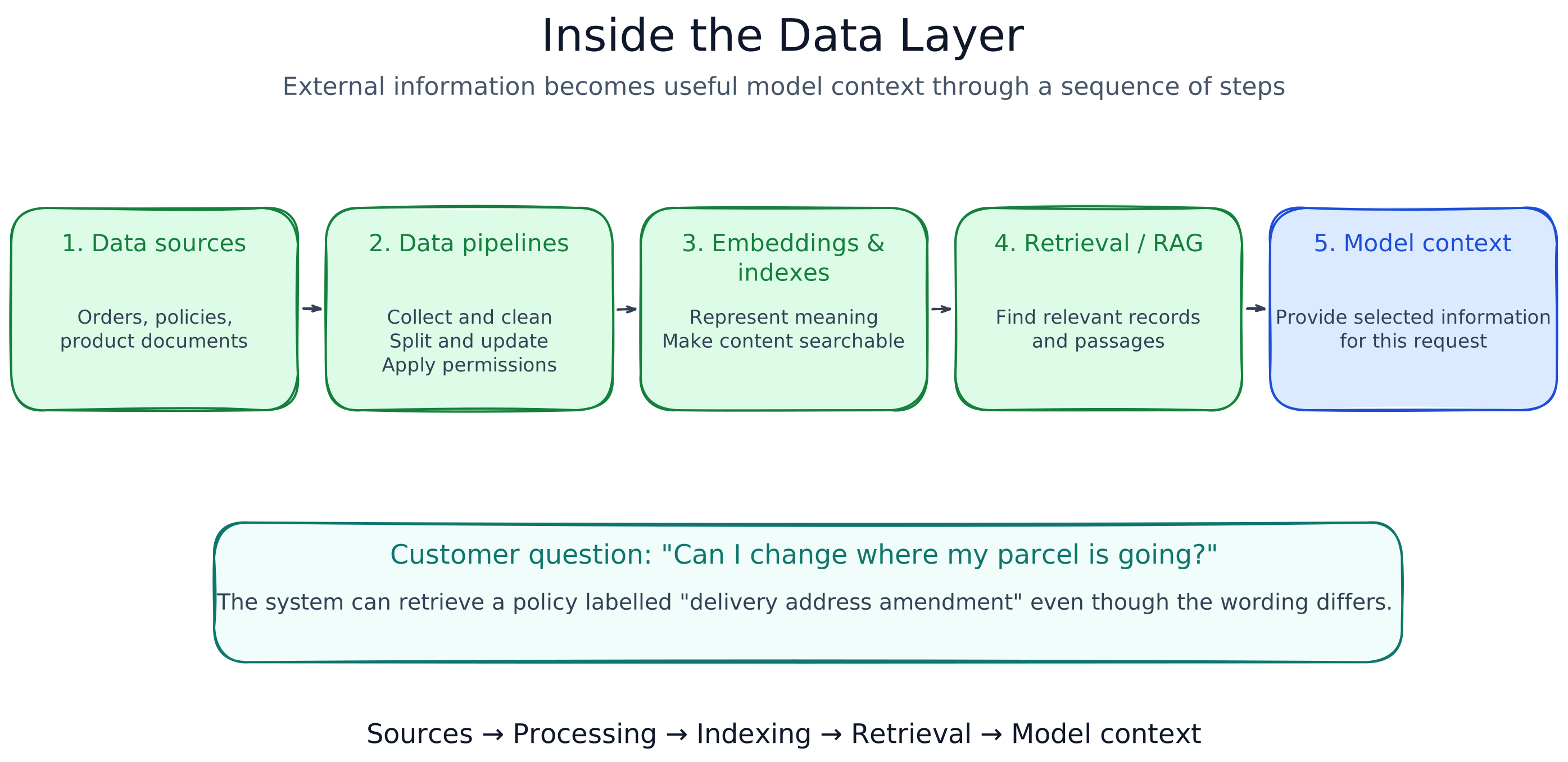
Data sources
These are the places where information comes from.
For a support assistant, they might include:
- Customer accounts
- Order and delivery systems
- Product documentation
- Company policies
- Support tickets
- Internal databases and APIs
Data pipelines
Raw data is rarely ready for use immediately.
Pipelines collect, clean, transform, and update it. They may split documents into smaller sections, remove duplicates, extract metadata, apply permissions, or convert different formats into a consistent structure.
Embeddings and indexes
The system needs a way to search information quickly.
One method is to create embeddings, which are numerical representations of meaning. An embedding model creates them, and a vector database or search index stores them.
This allows the system to find related information even when the wording is different.
A customer may ask:
"Can I change where my parcel is going?"
while the company policy uses the phrase:
"Delivery address amendment."
Semantic search can recognise that these mean roughly the same thing.
Retrieval and RAG
Retrieval is the process of finding the information needed for a specific request.
Retrieval-augmented generation, or RAG, gives that information to the model before it produces an answer.
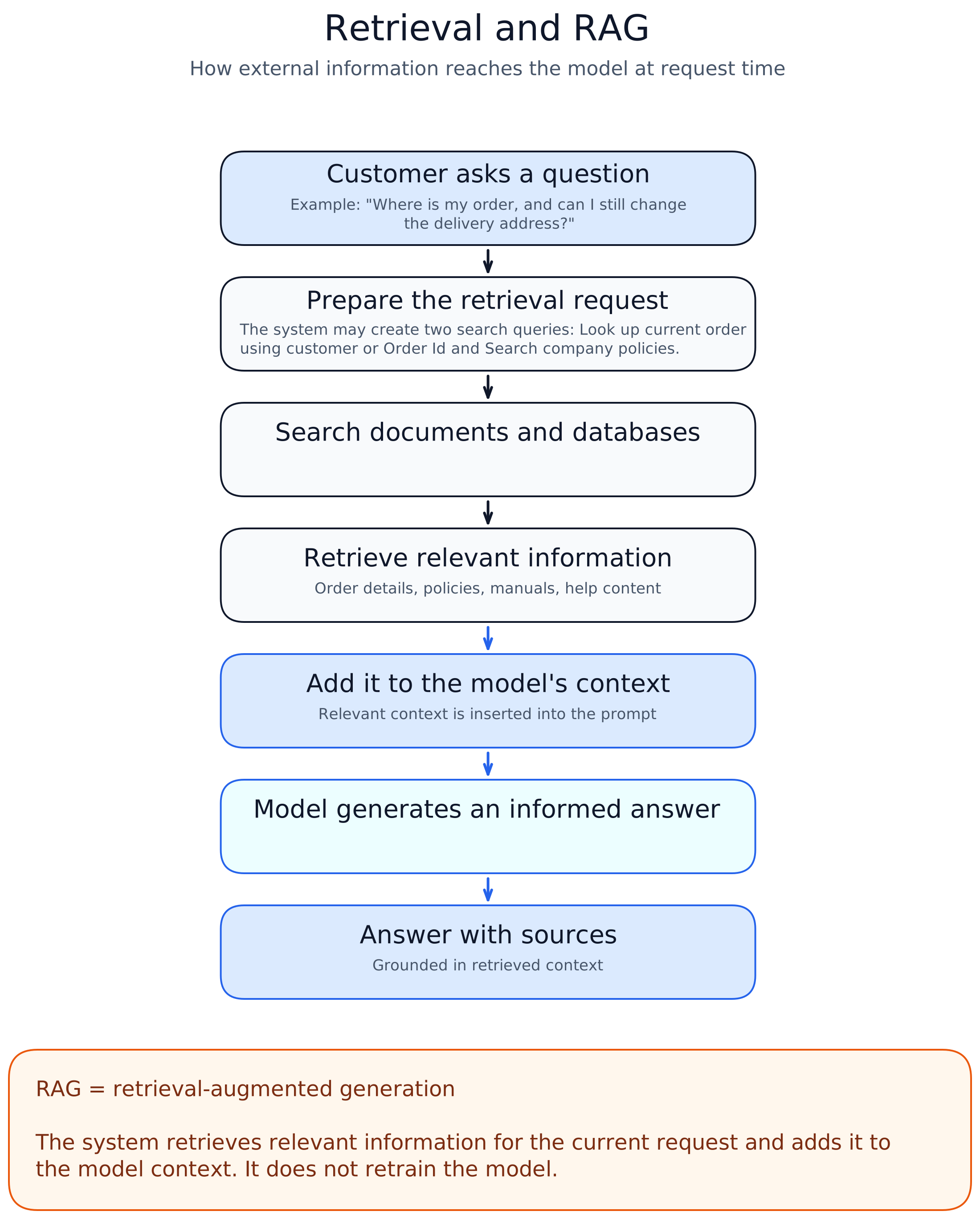
RAG does not permanently teach the model new facts. It supplies the right context for the current request.
The purpose of the data layer is to make the right information available, in the right form, at the right moment.
4. Orchestration
Simple AI tasks may require only one prompt and one response. More complex tasks need several steps.
The orchestration layer coordinates those steps. It connects the model with data, tools, and business rules.
It can be understood as three stages.
Planning
The system decides how to approach the request.
In our example, it recognises that it must check the order status and determine whether an address change is still possible.
Execution
The system performs the required actions.
It may retrieve the customer's order, call the delivery system, search the company policy, and ask the model to prepare a response.
These actions are often called tool calling or function calling.
Review
The system checks whether the result is complete and supported by the available information.
It may ask whether both questions were answered, whether the response matches the policy, or whether the case should be handed to a human agent.
If something is missing, it can repeat an earlier step.
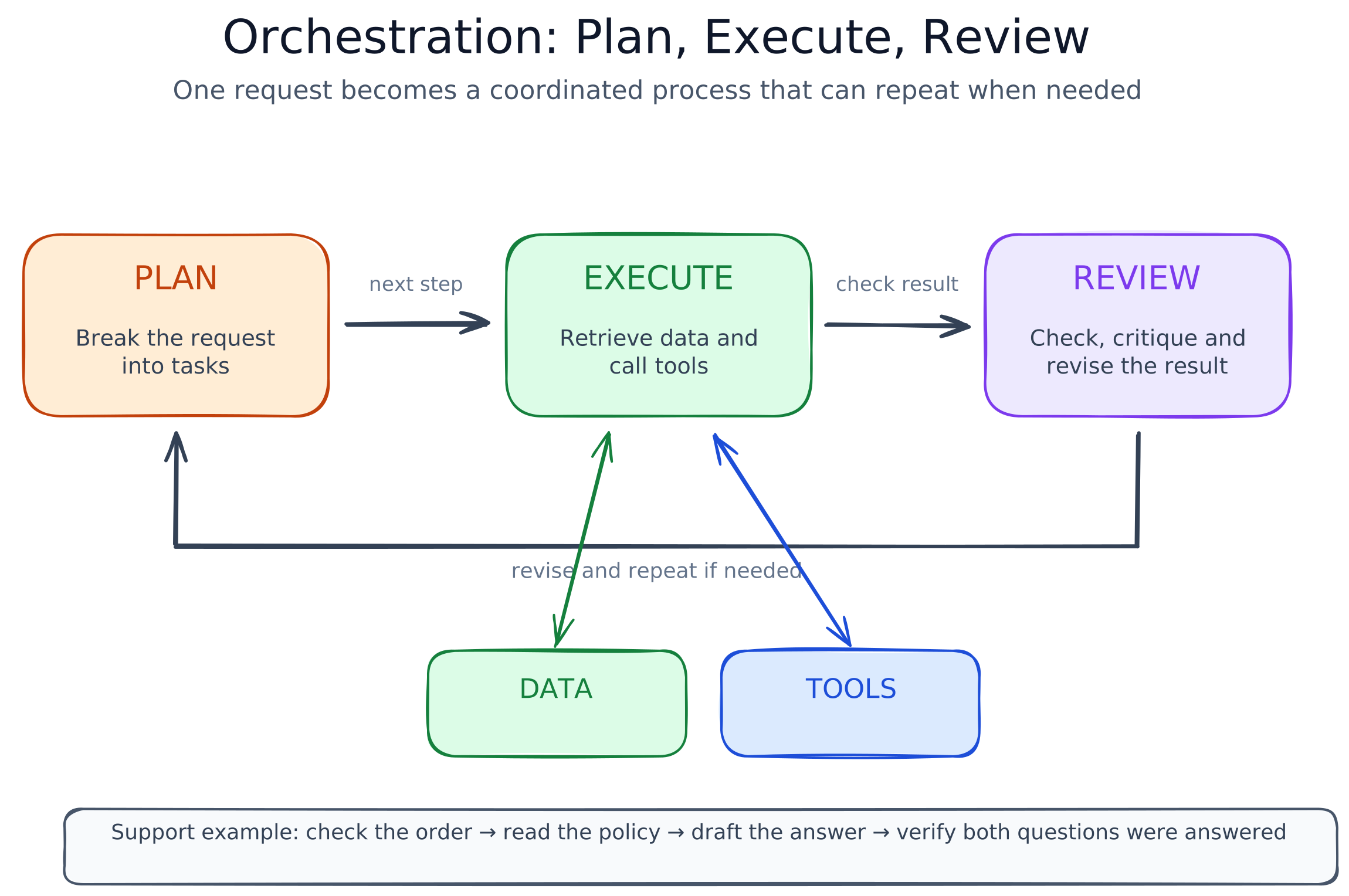
Some systems follow a fixed workflow. Others allow the model to make limited decisions about what to do next. This is where terms such as agents and MCP fit into the stack.
In simple terms:
Orchestration turns one user request into a coordinated process of planning, execution, and review.
5. Application
The application is the part of the system that people interact with.
It turns the models, data, and orchestration underneath into something useful for a real task.
The application layer has two main parts: interfaces and integrations.
Interfaces
The interface defines how users provide input and receive the result.
The most familiar example is text in and text out, but an AI application may also work with images, audio, documents, tables, forms, or numerical data.
For our support assistant, the interface may be a chat window that shows the order status, explains whether the address can be changed, and offers the next step.
A good interface should also let users inspect and improve the result through:
- Follow-up questions
- Citations or links
- Editing and revision
- Confirmation before an action
- Handover to a human
Integrations
Integrations connect the AI application with other tools and systems.
Information can flow into the AI system from customer records, delivery systems, and previous support conversations.
The AI application can also send results back, for example by updating a support ticket, opening an address-change request, or transferring the conversation to a human agent.
The interface helps people communicate with the AI system. Integrations connect it to the rest of their work.
How the layers work together
For our customer support example:
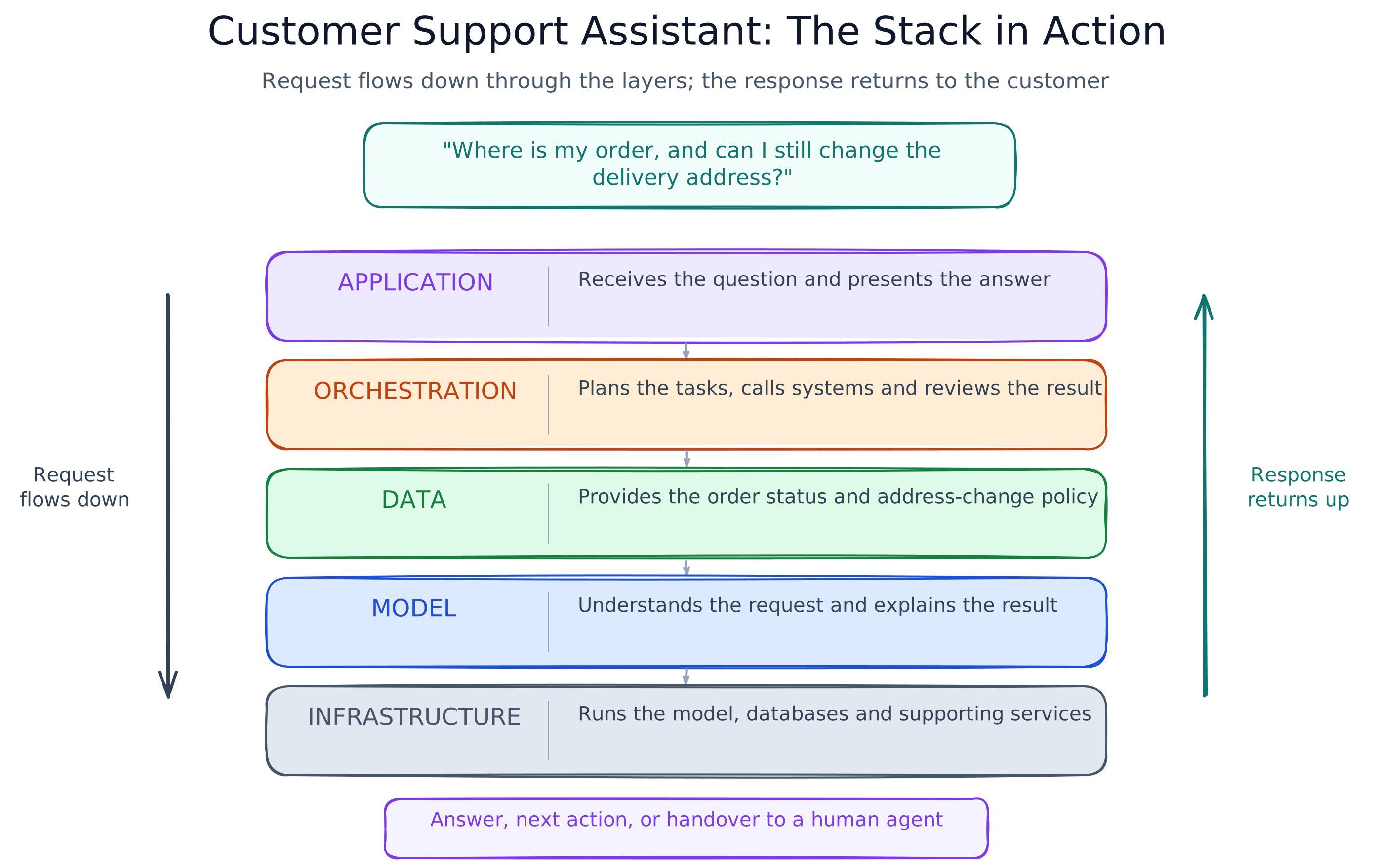
Each layer has a different role:
Infrastructure runs the system. Models provide AI capabilities. Data supplies relevant knowledge. Orchestration coordinates the work. Applications make the system useful.
Why the AI stack matters
Choices at every layer affect the final result.
A larger model may improve quality but increase cost. Better data may be more valuable than a more powerful model. Good orchestration can make a complex task more reliable. A clear application helps users understand and act on the result.
These choices influence four important outcomes:
Quality, speed, cost, and safety.
That is why building an AI product involves much more than selecting a model and writing a prompt.
Final summary
The AI stack can be remembered as five layers:
Infrastructure → Models → Data → Orchestration → Application
The infrastructure runs the model.
The model provides the capability.
The data adds relevant knowledge.
The orchestration coordinates the task.
The application connects the system to the user.
This is not a complete engineering blueprint, but it is a useful map for understanding how the main parts of an AI system fit together.