
LangChain vs LangGraph: What’s the Difference?
LangChain and LangGraph are both open-source frameworks designed to help developers build applications powered by large language models (LLMs).
So what are the differences, and why would you use one over the other?
A good place to start is by understanding what each framework does.
What Is LangChain?
At its core, LangChain is a way of building LLM-powered applications by executing a sequence of functions in a chain.
Imagine we want to build an application that performs three actions:
Retrieve → Summarize → Answer
First, the application retrieves some information. Then it summarizes that information. Finally, it uses the summary to answer a user's question.
LangChain provides components that we can combine to build each part of this workflow.
Retrieve
For the retrieve step, we might use a LangChain component called a document loader.
A document loader fetches and loads content from a data source.
If some of those documents are large, we might also use a text splitter to break the content into smaller, more manageable chunks.
Summarize
Next, we need to summarize the information we retrieved.
For this, we can use a chain to orchestrate the summarization process.
The chain might contain a prompt that tells the model what we want it to do, along with an LLM that performs the summarization.
Answer
Finally, we need to answer the user's question.
We can use another chain that combines memory or conversation context, another prompt, and an LLM to generate the final response.
The LLM used for answering does not even have to be the same model used for summarization.
Our application might look like this:
RETRIEVE              SUMMARIZE                 ANSWER
   ↓                      ↓                        ↓
Document Loader          Chain                    Chain
   ↓                      ↓                        ↓
Text Splitter           Prompt               Memory / Context
                          ↓                        ↓
                         LLM                     Prompt
                          ↓                        ↓
                       Summary                    LLM
                                                   ↓
                                                 Answer
The important idea is that LangChain has a modular architecture.
Different actions can use different components, while chains help orchestrate how those components work together.
What Is LangGraph?
LangGraph is designed for building stateful applications and agents that have more complex workflows.
Instead of representing the application mainly as a sequence of actions, LangGraph lets us represent the workflow as a graph.
A graph has three important concepts:
Nodes, edges, and state.
Imagine we're building a task-management assistant.
The assistant needs to:
- process user input
- add tasks
- complete tasks
- summarize tasks
In LangGraph, each of these actions can become a node.
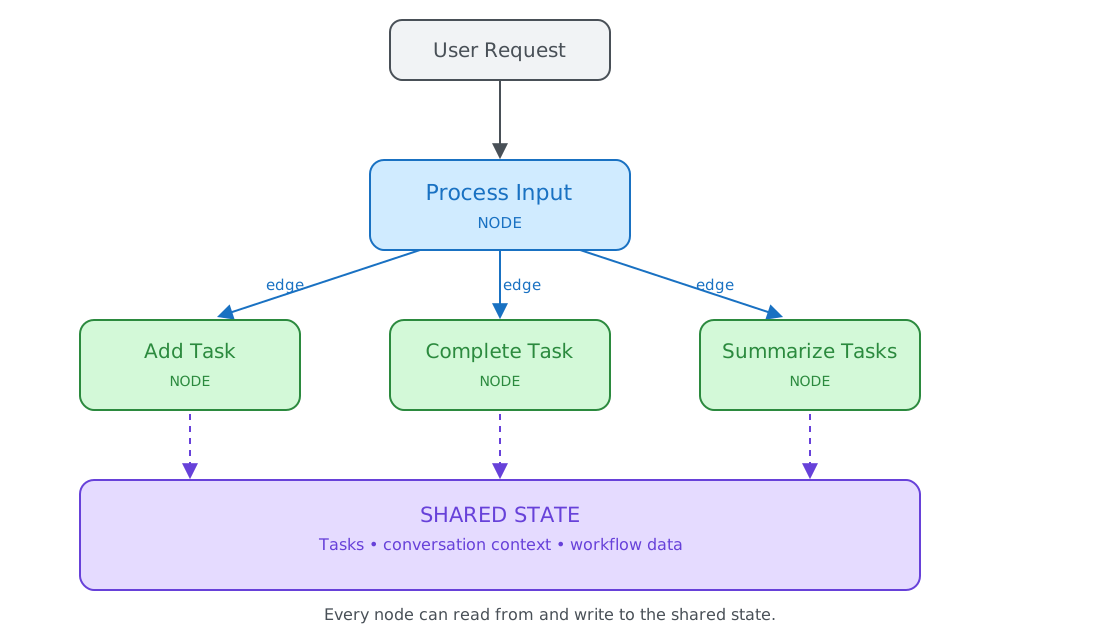
The connections between those nodes are called edges.
Edges determine where the application should go next.
For example, if a user says:
"Add buy groceries to my task list."
The Process Input node can understand the request and route it to the Add Task node.
If the user asks:
"What tasks do I still have?"
The request can instead be routed to the Summarize Tasks node.
Unlike a simple sequence, the workflow can move between different nodes depending on what is happening.
State
Another important part of LangGraph is state.
State contains information that needs to be available across the workflow.
For our task-management assistant, the state might contain:
Tasks:
- Buy groceries
- Finish report
- Call dentist
The Add Task node can add something to the state.
The Complete Task node can update it.
The Summarize Tasks node can read the same state and use an LLM to generate an overview of the current tasks.
Because the nodes can access and update the shared state, the application can maintain context as the user interacts with it.
This is what makes LangGraph useful for more flexible, stateful workflows.
LangChain vs LangGraph
Now that we understand the basic idea behind both frameworks, the difference becomes easier to see.
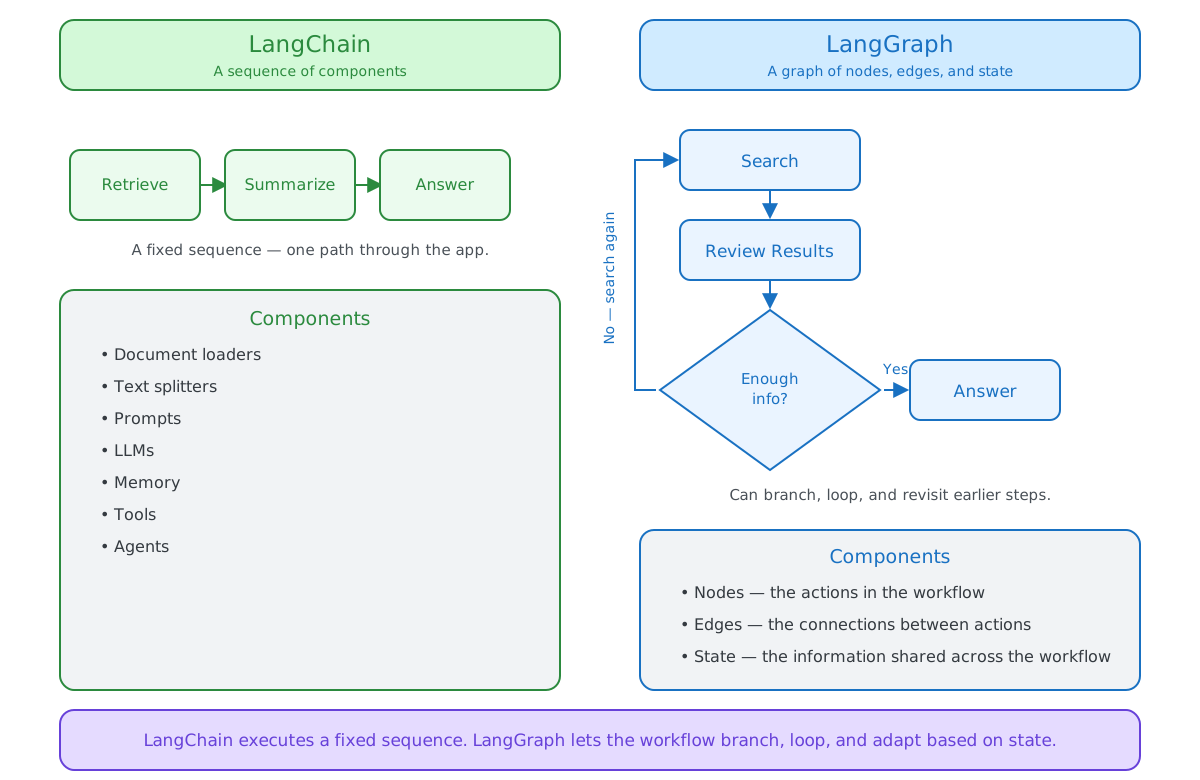
LangChain is useful when an application can be built by combining components into a sequence of actions. LangGraph uses a graph structure instead, which means the application can branch, loop, or return to previous parts of the workflow — useful when the next step depends on the current situation rather than being known in advance.
State Management
LangChain can pass information between different parts of an application and maintain conversation context.
LangGraph makes state a central part of the architecture.
Nodes can read and update the state as the application moves through the graph.
This makes LangGraph especially useful when an application needs to maintain context across many actions or interactions.
When Should You Use LangChain?
LangChain is a good choice when you want to connect LLMs with other components and build an application quickly.
For example, you might be building an application that:
- retrieves documents
- summarizes information
- answers questions
- calls tools
- interacts with APIs
- uses an LLM to perform several related tasks
LangChain gives you high-level components that you can combine instead of building everything yourself.
For beginners, it is usually the easier place to start.
When Should You Use LangGraph?
LangGraph becomes useful when your application needs a more flexible workflow.
You might need:
- multiple possible paths
- loops
- shared state
- long-running workflows
- human approval
- different actions depending on previous results
Imagine a research assistant that searches for information and then decides whether it has enough information to answer.
Research
   ↓
Evaluate
   ↓
Enough information?
 ↙              ↘
No              Yes
↓                ↓
Research Again  Answer
The application is not simply moving forward through a fixed sequence.
It can make a decision, return to an earlier step, and continue from there.
That is where LangGraph becomes particularly useful.
Can You Use LangChain and LangGraph Together?
Yes.
LangChain and LangGraph are part of the same ecosystem and can be used together.
In fact, modern LangChain agents are built on top of LangGraph under the hood. LangChain provides the higher-level agent abstraction, while LangGraph handles the underlying orchestration and state.
You can also use LangChain components such as models and tools directly inside a LangGraph workflow.
A simple way to think about the relationship is:
LangChain
Components for building LLM applications
        ↓
LangGraph
Control over complex workflows and state
You might start with LangChain and only use LangGraph directly when your application's workflow becomes more complex.
LangChain or LangGraph: Which Should You Choose?
If you're just getting started, LangChain is usually the easier place to begin.
It gives you reusable components for connecting models, prompts, data, tools, and other parts of an LLM application.
Use LangGraph when you need more control over how those components interact and how the application moves between different states.
The simplest way to remember the difference is:
LangChain helps you build LLM-powered applications by chaining components together.
LangGraph helps you build flexible, stateful workflows using nodes, edges, and state.
They solve related problems, and for more advanced applications, you may end up using both.